
Back to blog
Aug 26, 2026
AI Video Prompt Guide: Fix Seedance 2.5 Failures | MkAnime
Diagnose Seedance 2.5 failures and fix character drift, chaotic camera moves, broken motion, weak endings, and audio mismatch one variable at a time.
Aug 26, 2026
Diagnose Seedance 2.5 failures and fix character drift, chaotic camera moves, broken motion, weak endings, and audio mismatch one variable at a time.
Diagnose the first moment your Seedance 2.5 clip breaks, then revise only the single control responsible instead of rewriting the whole prompt.
By Sonya, Contributor of MkAnime · Published August 26, 2026
Disclosure: Sonya contributes to MkAnime, whose Seedance 2.5 workflow is described in this guide. AI assistance was used to organize and edit the article. The workflow steps and MkAnime product claims were reviewed against the current implementation on August 26, 2026.
An AI video prompt guide should help you diagnose a failed clip, not just offer a longer prompt. When Seedance 2.5 changes the character, spins the camera, breaks the action, loses the ending, or mistimes the sound, find the earliest failed control and revise only that part.
This troubleshooting workflow uses observable symptoms. It avoids the vague instruction to “add more detail,” because more detail can create new conflicts while leaving the original cause untouched.
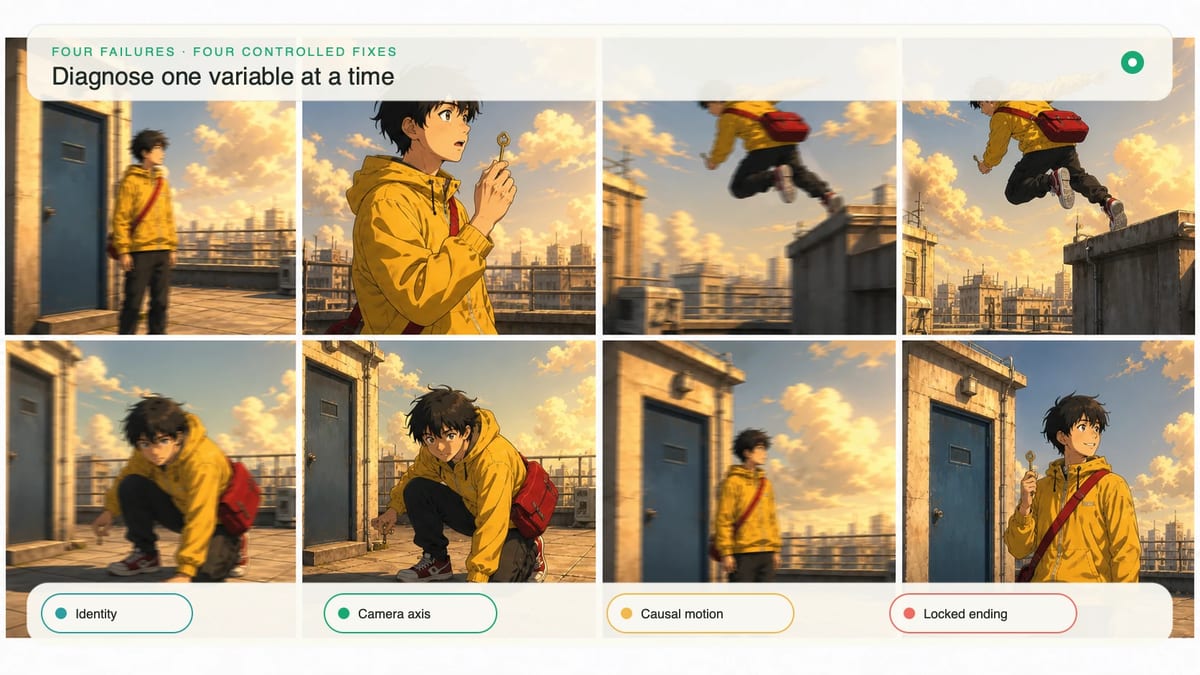
Watch the clip once without pausing, then review it frame by frame and record the first moment the shot becomes unusable. Later problems may be downstream effects.
| Symptom | Likely control | First question |
|---|---|---|
| Face, hair, or clothing changes | Identity anchors or conflicting references | Did the subject change before the action began? |
| Camera spins or changes direction | Camera instruction | Did the prompt assign more than one camera job? |
| Body skips between poses | Action chain or duration | Is the visible cause missing, or are too many beats compressed? |
| Ending introduces a new action | End-state instruction | Did the prompt define a final composition and settle time? |
| Sound arrives before or after the event | Audio timing | Is the sound tied to a visible cause? |
Save the prompt and settings with the failed result. A diagnosis without the original inputs cannot support a controlled comparison.
The Seedance 2.5 anime tests are useful as model evidence, but they do not predict every subject or shot. Review your own output against the decisions written in its prompt.
Character drift often comes from ambiguity or contradiction, not from a shortage of adjectives. Reduce the identity line to visible facts that must remain stable: hair shape and color, face cues, silhouette, clothing construction, one signature accessory, and the reference image if the project uses one.
Weak:
Beautiful mysterious anime girl, extremely detailed, many emotions, elaborate fashionable clothes, cinematic.
Stronger:
Original adult courier with a short copper bob, amber eyes, teal rain jacket with one white zipper, silver camera strap from right shoulder to left hip, compact silhouette. Preserve the same face, hair length, jacket construction, and strap side throughout the shot.
Do not repeat the identity paragraph inside every beat. State it once, then mention a vulnerable anchor only when the action affects it. If several reference images disagree, remove the weaker ones instead of asking the prompt to reconcile them.
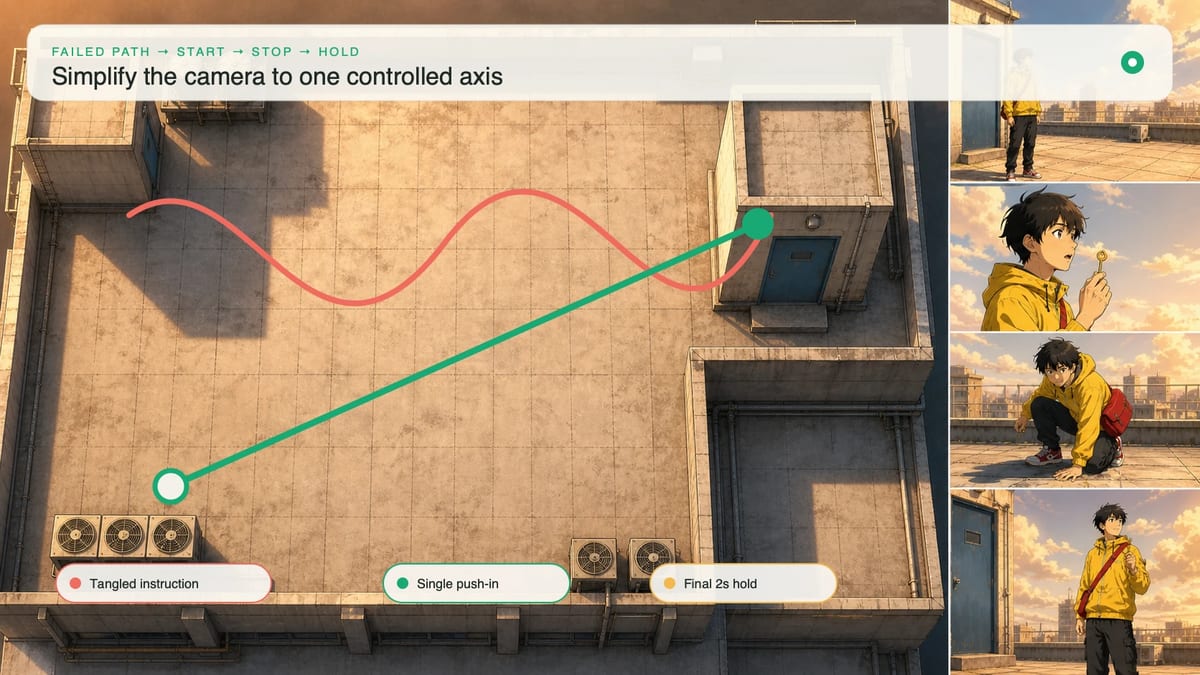
Camera chaos begins when the prompt treats every camera term as a quality enhancer. Orbit, pan, zoom, handheld, crane, and tracking are different movement systems; combining them in a short shot gives the frame no stable rule.
Choose one job and define its boundaries:
Camera: begin in a locked waist-up three-quarter view. Make one slow push-in along the same axis, ending in a close-up when the character turns. No orbit, no cut, no change of screen direction. Stop moving for the final two seconds.
If the subject also moves, state who owns each direction. “The character runs left to right while the camera tracks laterally at a stable distance” is clearer than “dynamic camera follows the action.”
Use the Seedance 2.5 prompt examples to inspect how a camera instruction sits beside the rest of a tested prompt. Compare structure and result; do not assume that copying a camera phrase will produce the same shot with a different subject.
Broken motion looks like teleportation, pose popping, or an object moving before contact. Rewrite the action as a physical chain: trigger, preparation, main movement, contact, reaction, settle.
Instead of:
She jumps dramatically over the railing and lands heroically while debris flies.
Use:
The warning light flashes. She looks toward the lower roof, plants both feet, and grips the satchel strap. She pushes off once, clears the railing, lands on both feet with bent knees, then steadies upright. Dust lifts only after her shoes contact the roof and falls as she becomes still.
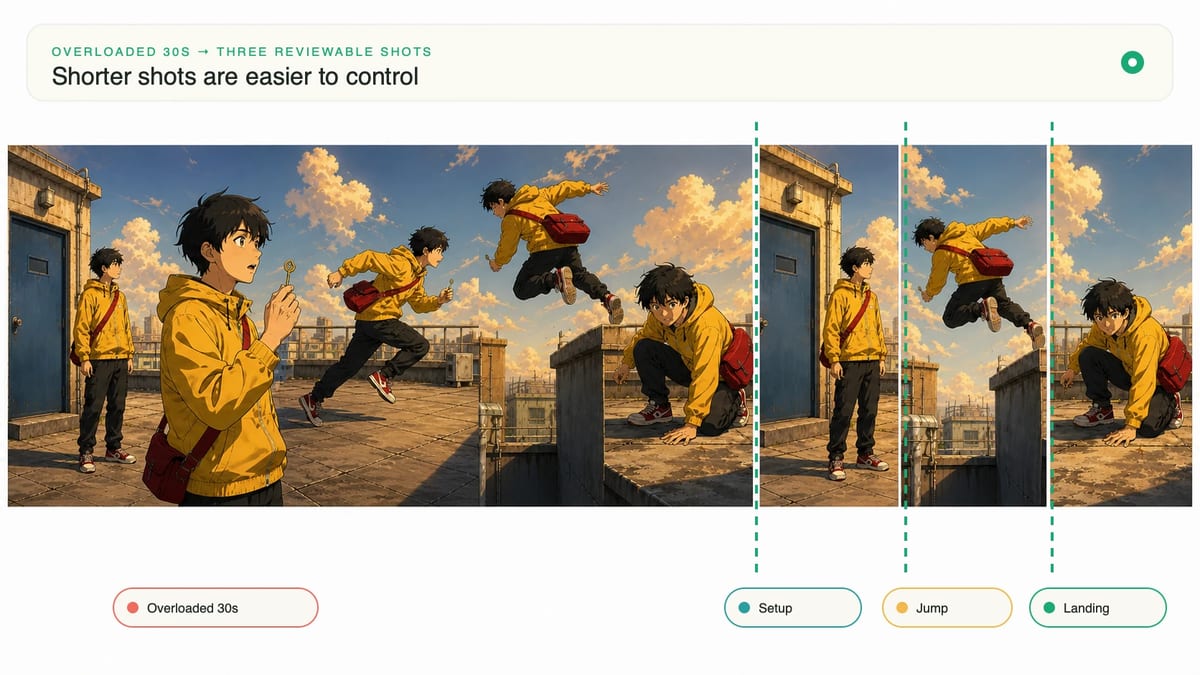
If the selected duration cannot show every phase, remove a beat or choose a longer duration. Do not compress a preparation, jump, landing, dialogue line, camera orbit, and new reveal into five seconds.
A weak ending often starts a new action because the prompt explains what happens but never says where the shot stops. Define the last frame as carefully as the first.
Include subject pose, framing, important prop state, background anchor, light, and motion state:
Final frame: stable medium close-up from the front. The courier is upright and still, left hand holding the red satchel strap, blue rooftop door closed behind the right shoulder, face fully readable in late-afternoon light. Camera, hair, clothing, dust, and background motion settle during the final two seconds. No new action or character enters.
If a precise destination is essential, use a project last-frame reference. Text can describe the goal, but a visible frame gives the generation a more concrete boundary.
Tie sound to a visible event and state what continues underneath it. “Footsteps, wind, dialogue, music” names ingredients but not a sequence.
Use causal timing:
Audio: low rooftop wind throughout. One shoe scrape begins as the character plants the foot. The landing impact occurs at visible contact, followed by a short fabric rustle. After the character becomes still, she says, “Made it.” No music and no additional impact sounds.
If dialogue overlaps the main action, move it after the settle or shorten the line. If effects are correct but a generated voice is not usable, keep the picture and replace the voice in post-production rather than discarding the whole shot.
Open the failed result in the Seedance 2.5 video generator, retain its ratio, resolution, duration, and unrelated prompt text, then change only the diagnosed control.
Use a revision log:
| Version | Observed failure | Single change | Result |
|---|---|---|---|
| V1 | Camera orbits during the turn | Replaced four camera verbs with one push-in axis | Compare framing only |
| V2 | Character changes after the landing | Reduced identity line and removed conflicting reference | Compare identity only |
| V3 | Ending continues into a second action | Added final pose and two-second settle | Compare final three seconds only |
Do not improve several categories at once unless the prompt is being rebuilt from scratch. A prettier result is not useful evidence if you cannot tell which change caused it.
Shorten the shot when the core idea remains good but the duration contains too many independent beats. Keep the most important action and ending, then move the setup or aftermath into another storyboard panel.
Regenerate a shorter shot when:
Troubleshooting ends when the shot has one clear job and passes the review criteria for that job. The best fix may be a more precise prompt, a better reference, or a shorter generation boundary—not more words.
From inspiration to complete plot, quickly output chapter structure