
Back to blog
Aug 29, 2026
AI Anime Project vs Individual Tools: When to Use Each
Learn when to use a connected MkAnime project or a focused tool for anime scripts, characters, images, voices, short videos, and dubbing.
Aug 29, 2026
Learn when to use a connected MkAnime project or a focused tool for anime scripts, characters, images, voices, short videos, and dubbing.
Choose the smallest workflow that can hold the decisions your final output depends on.
By Sonya, Contributor to MkAnime · Published August 29, 2026
Disclosure: I contribute to MkAnime, the product shown in this guide. AI assistance was used to organize and edit the article. Product behavior, output formats, and screenshots were checked against the current MkAnime implementation on August 29, 2026.
Use a MkAnime project when later work needs the same story, characters, scenes, style, and shot decisions. This is usually the right choice for an anime short, an episode, or a series with recurring assets.
Use an individual tool when you need one clear output now: a script, an illustration, a character reference sheet, an MP3 voice track, a short generated video, or a dubbed MP4.
That is the whole decision in one sentence:
Choose a project when the next step depends on the last step. Choose a tool when one result can stand on its own.
Ask these four questions in order:
If you answered yes to any of the first three questions, start a project.
If you answered yes only to the last question, open a focused tool.
| Your task | Best starting point | Why |
|---|---|---|
| Make a 30–120 second anime episode | MkAnime project | story, cast, scenes, storyboard, and shot media stay connected |
| Plan several episodes with a recurring cast | MkAnime project | shared characters and locations can be reused |
| Test one premise as a screenplay | AI Anime Script Generator | you only need an editable first draft |
| Design one recurring character before production | Anime Character Creator | you need a full-body design and reference sheet |
| Create one poster or illustration | AI Anime Image Generator | the image is the final standalone asset |
| Generate one dialogue track | Anime Voice Generator | the output is a downloadable MP3 |
| Make one 5–30 second text-prompt video | Seedance 2.5 Video Generator | the prompt can go directly to a single video result |
| Turn a short story into one 15-second storyboard-led video | GPT Image2 to Video Generator | one compact flow creates the board and short video |
| Replace the dialogue audio in an existing short video | AI Dubbing | the task begins with a video and subtitle timing |
You can also scan the MkAnime Tools Hub when you already know the output you want.
Every AI anime workflow has two kinds of information.
Local information matters to one task. A voice line needs text, voice, language, emotion, and speed. A single image needs a prompt, style, ratio, and resolution.
Project context matters across tasks. It includes the premise, episode purpose, recurring cast, location rules, aspect ratio, style direction, shot order, dialogue, and approved media.
An individual tool is efficient when local information is enough. A project becomes useful when a decision must survive into the next stage.
For example, imagine that you are making a rooftop confrontation.
The visual subject may be the same. The amount of context you must preserve is different.
A project is the right starting point when you are producing a sequence instead of a single asset.
The project flow starts with a name and story description. You then choose settings such as aspect ratio, video model, image model, content type, style, dialogue language, episode length, story rhythm, and episode count.
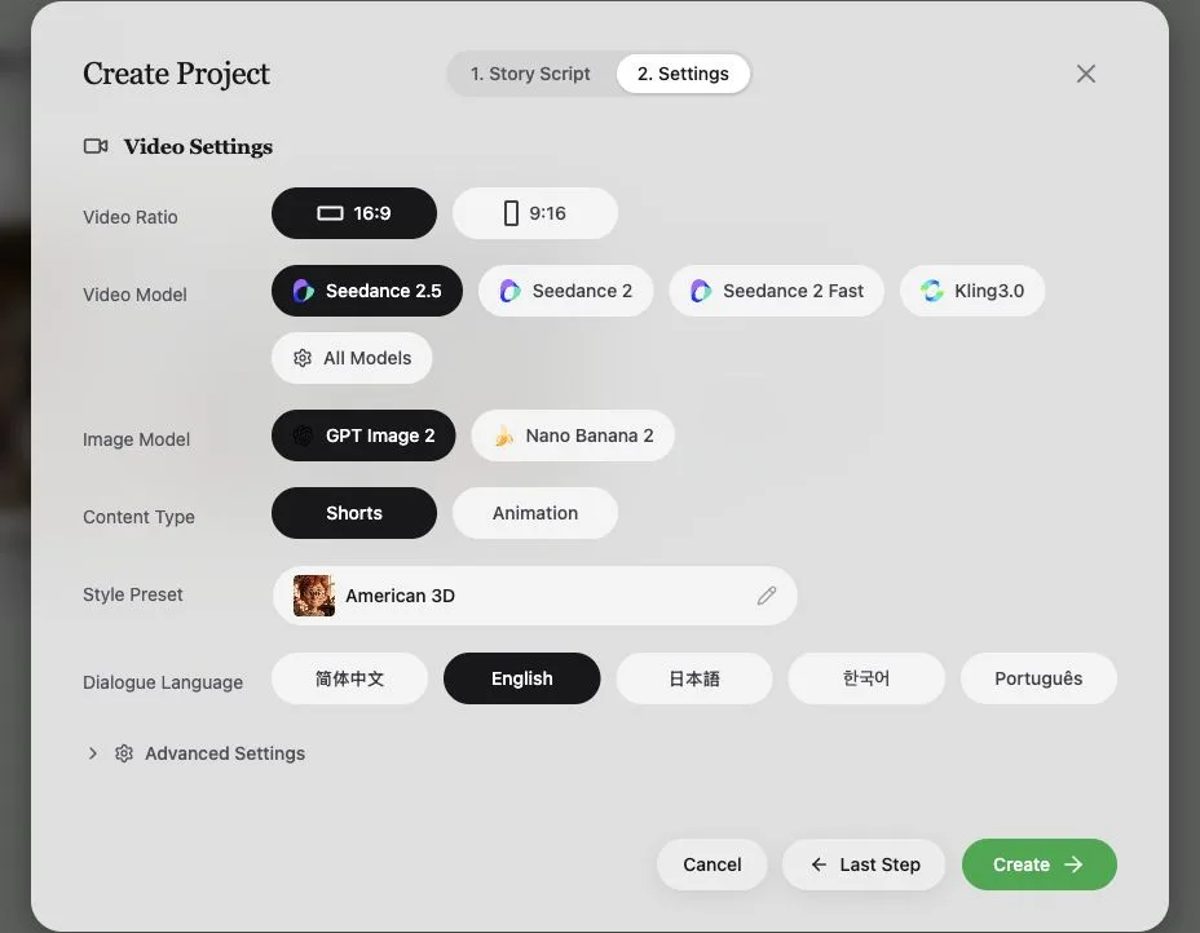
Project settings define the delivery format before scripts and images spread that decision across the episode.
MkAnime uses that setup to create a story foundation, episode outlines, scripts, reusable character and scene assets, storyboards, shot images, video clips, and dialogue audio.
This structure is most useful when the output has several connected beats. A mistake in episode purpose can affect the script. A script change can affect characters, locations, dialogue, and shots. Keeping these layers together makes the change easier to trace.
For the full production order, follow the step-by-step AI anime episode guide.
A recurring character needs more than a good first image. The face, hair, outfit structure, body proportions, props, and voice need stable reference points.
A project keeps character and scene records attached to the story and episode. Those assets can then be assigned to storyboard shots instead of described again from memory.
This does not guarantee identical results. It gives you a shared reference and a clear place to fix drift. If character identity is the main problem, use the guide to keep AI anime characters consistent across shots.
Longer work becomes safer when you approve it in layers:
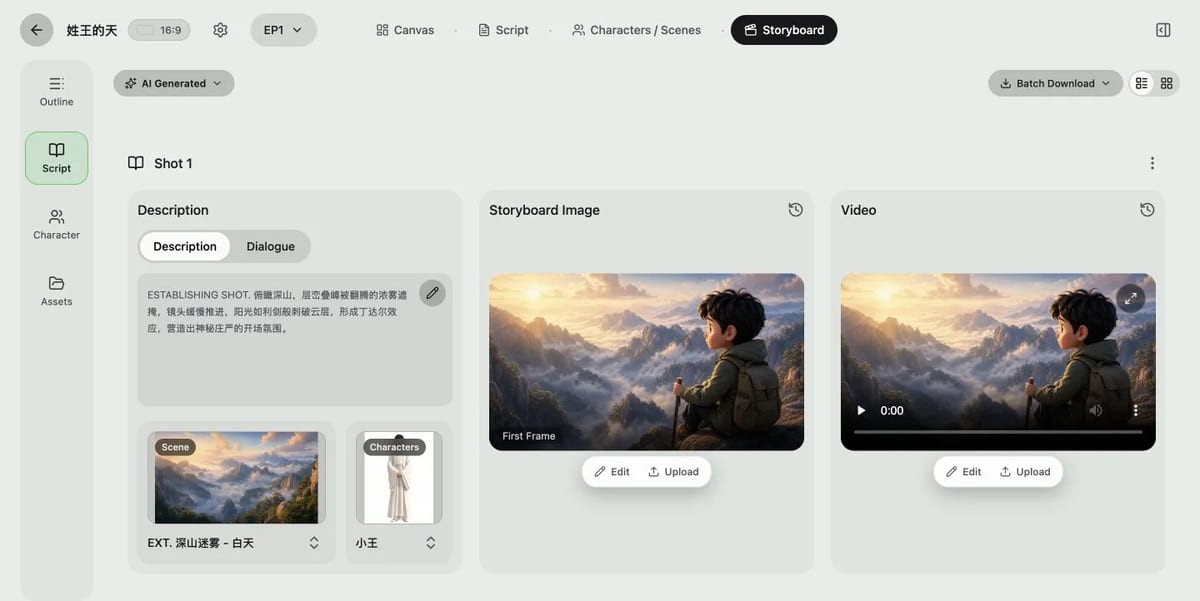
A project connects each storyboard shot to its description, dialogue, scene, characters, and generated media.
These checkpoints reduce expensive rework. Changing one paragraph is cheap. Regenerating ten clips because the paragraph was wrong is not.
In a project, you can review shots individually. A weak close-up can be revised without discarding every approved environment shot. The same principle applies to images, video, and audio.
Use batch generation after the story, references, and storyboard are stable. Use selective regeneration when one result fails.
The first episode helps you discover your real rules: how long scenes should be, how much dialogue fits, which character traits drift, which motion prompts work, and how assets should be named.
A project gives those rules a home. The next episode can reuse the cast, environments, review order, and export checklist.
The current MkAnime project workspace exports available images, videos, and audio as separate ZIP files. It does not show an automatic full-episode assembly or automatic lip sync step in the workflow reviewed for this guide.
Plan to finish shot order, trimming, music, sound effects, subtitles, mouth timing, titles, and final delivery in a video editor.
This boundary matters. Choose a project for connected planning and asset generation. Keep final editorial assembly in your delivery plan.
Use a focused tool when the output can stand alone and the task has a clear finish line.
Choose the AI Anime Script Generator when you want to test a story idea, scene structure, dialogue, tone, or target pace before opening a production project.
It turns one brief into an editable screenplay with numbered scenes, visible action, and dialogue. You can revise, save, copy, or download the result as Markdown.
Use it when writing is the final task for now. Start a project when the approved screenplay must feed recurring characters, locations, storyboards, and shot production.
Choose the Anime Character Creator when you need a 3:4 full-body character plus a 16:9 reference sheet with front, three-quarter, and side views.
This is useful before a project when you want to settle the silhouette, outfit, colors, and signature details. It is also useful outside a project for a game concept, profile art, writing reference, or design handoff.
Move into a project when that character must stay connected to a story, scenes, dialogue, and multiple shots.
Choose the AI Anime Image Generator for a standalone poster, thumbnail, concept image, background, or social post.
The focused inputs are prompt, style, aspect ratio, and resolution. The result does not need an episode outline or shot order.
Use a project when the image is a first frame inside a longer sequence and must match recurring project assets.
Choose the Anime Voice Generator when you need dialogue audio from written text. Select an available voice, language, emotion, and speaking speed, then preview and download the MP3.
This works well for voice tests, animatics, character auditions, narration, and one-off lines. If you are casting a heroine or another girl character, the anime girl voice text to speech guide shows how to shortlist female voices by personality and direct the delivery.
Use a project when many lines must stay assigned to story characters and storyboard shots.
Choose the Seedance 2.5 Video Generator when a text prompt contains enough information for one 5–30 second video. The tool supports output controls, generated audio, and reusable generation history.
This is a direct route for a motion test, mood shot, visual experiment, or self-contained clip.
Use a project when the clip must match a larger script, recurring cast, established locations, neighboring shots, or episode timing.
Choose the GPT Image2 to Video Generator when you want to write a short original story, generate a widescreen storyboard, review it, and create one 15-second video guided by that board.
The current public flow starts from the story written inside the tool. It does not begin by uploading an arbitrary finished image.
Use a project when you need more than this compact run: several shots, reusable project assets, episode planning, or broader export control.
Choose AI Dubbing when you already have a short video plus SRT or VTT captions. Select a voice, generate the replacement dialogue, and download a new MP4 with the original audio replaced.
This is a delivery-stage task. It is useful for language versions, prototypes, and timed narration replacement.
Use a project when you are still creating the story, cast, shots, and source video.
You do not have to choose one surface for the entire life of an idea. Many practical workflows use a focused tool first and a project later.
Use this order when the idea is still cheap to test:
This keeps early exploration light. The project begins when the work needs shared context.
Use this order when the main story already lives in a project:
For example, you might use the voice generator to audition a tone, Seedance 2.5 to test one motion idea, or AI Dubbing to create a language version after the source video is ready.
The important rule is simple: keep the source of truth clear. If a tool result becomes part of the episode, record which character, scene, shot, and version it belongs to.
Start a project. Even a short video has a premise, cast, aspect ratio, script, shots, media, audio, and final edit. The connected workflow will expose weak decisions early.
Use the character creator. The result is a defined asset with a clear deadline. You can create a project later if the pitch moves into production.
Use the script generator. Keep the test at the text layer. If the screenplay works, move the approved premise into a project.
Use Seedance 2.5. A single prompt-led result is enough. Start a project only if the clip must connect to other story and asset decisions.
Use AI Dubbing with a checked SRT or VTT file. Review translation, timing, pronunciation, speaker choice, and rights before delivery.
Start with a tool if the task is uncertain, isolated, and easy to discard.
Switch to a project when you notice any of these signals:
Start with a project if you already know those conditions are true.
Yes. They are useful for testing a premise, character, image style, voice, or motion idea. Create a project when the approved work needs shared story and production context.
No. A self-contained 5–30 second prompt video may be faster in Seedance 2.5. A compact 15-second story-to-storyboard run fits GPT Image2 to Video. A project is more useful when several connected stages, shots, or recurring assets matter.
Use the Anime Character Creator for a full-body design and three-view reference sheet. Use a project when that character needs to stay connected to episodes, locations, dialogue, and shots.
The project workflow reviewed on August 29, 2026 exports available images, videos, and audio in separate ZIP files. Final assembly, sound mixing, subtitles, titles, and delivery still belong in your video editor.
Keep the useful output and switch when the workflow changes. A script, reference sheet, MP3, or test clip can still inform the project. Record what was approved and where it belongs.
The best starting point depends on how many later decisions need the same context.
Use a project for connected production: episodes, recurring characters, reusable scenes, storyboards, shot media, dialogue, and review checkpoints.
Use an individual tool for one finished job: a screenplay, character design, illustration, MP3, short video, or dubbed MP4.
If you are still deciding, open the MkAnime Tools Hub. If you already know the idea will become a connected anime short or series, start an AI anime project.
From inspiration to complete plot, quickly output chapter structure