When people search for an anime character builder to make or create their own anime character, they usually run into two kinds of tools. Classic dress-up builders let you click through fixed hair, eye, and outfit slots, which is fast until the character you have in mind needs a jacket cut, hairstyle, or silhouette that is not in the menu. Pure image generators give you total freedom, but every click draws a slightly different person from one angle.
The MkAnime anime character creator works like a modular prompt-based builder. Instead of clicking fixed part slots, you write each building block in plain text, pick a rendering preset from the Style Picker, and generate a 2K 3:4 full-body design together with a 16:9 multi-angle reference sheet in one run. This guide shows how to build your own anime character step by step, what inputs you actually control, and what the tool does not do.
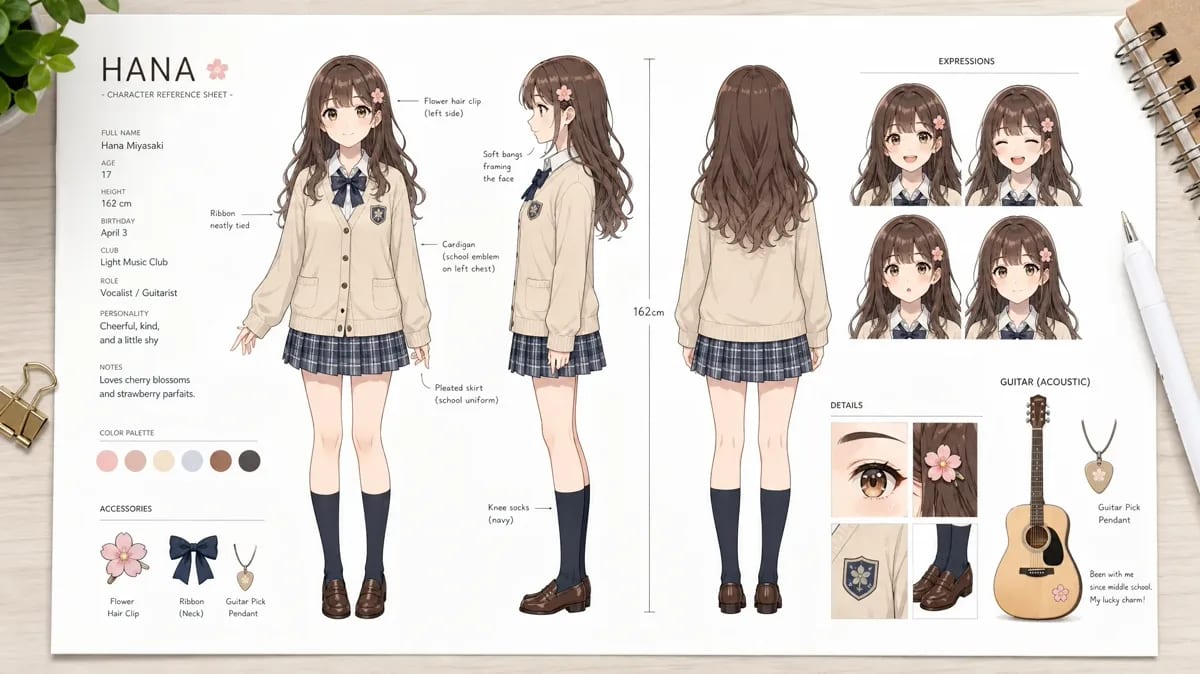
One character build returns a 3:4 full-body image on white and a 16:9 reference sheet with portrait, front, side, and back views.
Knowing the difference before you start saves wasted runs:
| Feature | Dress-up / parts-menu builder | MkAnime AI character builder |
|---|
| How you build | Pick eyes, hair, and clothes from pre-drawn layers | Write modular traits (3–1,200 characters) + choose a Style Picker preset |
| Design freedom | Limited to the artist's asset pack | Custom silhouettes, layered outfits, props, and color palettes |
| Angles returned | Usually one front-facing doll | 2K 3:4 full-body front view + 16:9 close-up and front/side/back sheet |
| Photo or sketch upload | Rare | No upload—text brief and style preset only |
| Cost | Often free browser game | Sign-in required; uses account credits (new accounts start with 0 credits) |
If you want a zero-typing avatar game where you tap preset eyes and shirts, use a traditional dress-up maker. If you want to create your own anime character for a comic, storyboard, visual novel, or original story cast—and need a turnaround sheet you can reuse—use the modular brief workflow below.
The anime character creator has three inputs and two outputs:
- Character name (required, up to 120 characters). Stored with the asset card so you can organize a cast list later.
- Character description (required, 3 to 1,200 characters). All visible traits from head to toe: build, face, hair silhouette, layered outfit, footwear, one prop, and color palette.
- Style preset (Style Picker). Determines linework, shading, and rendering medium. Important: the tool opens on American 3D by default. If you want classic 2D cel anime, manga ink, manhwa, or chibi proportions, open the Style Picker and switch presets before clicking generate.
Every successful run produces:
- A 2K
3:4 full-body image centered head-to-toe on a plain white background.
- A
16:9 reference sheet generated from that main image, pairing a portrait close-up on the left with full-body front, side, and back views on the right.
Treat your description like six snap-together slots. Writing them in the same order makes it easy to swap one piece—such as changing boots or hairstyle—without rewriting the whole character.
- Role, age, and body build.
"An adult airship navigator in her early twenties, tall with a lean athletic frame." State adulthood and full-body proportions early so the 3:4 frame shows head to toe.
- Face and eye read.
"Sharp amber eyes, confident half-smile, small beauty mark under the left eye." Pick one clear expression rather than conflicting moods.
- Hair silhouette.
"Chin-length navy bob with asymmetric swept bangs and two silver hairpins on the right temple." Silhouette shapes survive side and back views better than tiny loose strands.
- Top, bottom, and outerwear.
"Cropped cream flight jacket with brass snaps over a dark ribbed turtleneck, high-waisted slate cargo trousers tucked into calf-high brown leather boots." Always include lower garments and footwear so the generator does not crop at the knees.
- One signature prop or accessory.
"A brass astrolabe clipped to a crossbody leather strap." Keep props to one or two clear items.
- Three-color palette.
"Palette: cream, slate navy, warm brown leather, brass accent." Locking colors prevents random rainbow trim.
2D cel-shaded action lead (switch Style Picker to a 2D anime preset first)
Kaelen Voss, an adult courier in his mid-twenties, medium build with long legs, standing full body head to toe. Narrow teal eyes, calm focused expression, thin healed scar across the bridge of the nose. Messy charcoal-black hair cropped short at the neck with a single white forelock. Wears a structured olive field coat with rolled cuffs over a black Henley shirt, tapered dark grey trousers, and laced black combat boots. Fingerless leather gloves and a compact silver transit badge on the left collar. Palette: olive green, charcoal black, slate grey, silver accent.
Fantasy mage OC (2D anime or painterly fantasy preset)
Lyra Solis, an adult archivist mage in her twenties, petite build, standing full body with shoes visible. Large violet eyes, gentle curious smile, round gold-rim glasses. Long silver-white hair braided into a thick single plait resting over her right shoulder. Wears a navy velvet short cape over a pleated ivory tunic, belted waist satchel, dark navy stockings, and low-heeled brown ankle boots. Holds a closed leather-bound field journal in one hand. Palette: ivory, deep navy, warm brown, gold accent.
Because the main character image always uses a clean white background, MkAnime automatically strips background instructions before generating. The sanitizer splits your text on commas, semicolons, and line breaks (not periods) and removes any clause containing words like background, backdrop, scene, setting, or environment.
If you write "wearing a cloak the color of a midnight forest scene, silver clasp", the entire first comma-separated clause is dropped—taking the cloak with it. Name garment colors directly ("midnight-green cloak, silver clasp") and leave locations out. Once your character sheet is locked, move to the AI anime image generator whenever you want to place that character inside a classroom, rooftop, or forest scene.
When you build a character in a traditional dress-up maker, changing the jacket never changes the face. In an AI character builder, every regeneration is a fresh draw—so change one block at a time:
- Keep blocks 1–3 word-for-word (build, face, hair) while testing a new outfit in block 4.
- Check style before editing text. If your character came back looking like a 3D animated movie when you wanted 2D anime linework, you probably left the Style Picker on the default American 3D preset.
- Use the built-in prompt optimizer selectively. If a brief is too sparse, test one optimized version, then trim anything you do not want repeated on the turnaround sheet.
For a deeper breakdown of nine-part character descriptions, see the anime character prompt template. To compare how cel, manga ink, watercolor, and 3D presets change the same brief, read different anime art styles for character design. Once your cast is ready for dialogue or motion, pair the character with the anime voice generator or plan shots in the AI anime storyboard workflow.
- No photo-to-anime upload. You cannot upload a selfie, sketch, or existing character picture to convert it; the builder runs strictly from name, text brief, and style preset.
- One character per generation. Build team members one by one so each turnaround sheet stays clean.
- Original SFW characters only. Do not prompt copyrighted characters from existing anime series or games, and keep briefs safe for work so safety filters do not reject the generation.
- Account credits required. Signing in is required, each account runs one character generation at a time, and new accounts start with
0 bonus credits—check current plans on the pricing page before starting a cast batch.
Open the MkAnime anime character creator, choose a 2D or 3D preset in the Style Picker (switching off the default American 3D preset if you want flat 2D anime), enter a character name, and write a short head-to-toe brief covering build, eyes, hair silhouette, outfit including shoes, and a three-color palette. One generation returns both a 2K 3:4 full-body design and a 16:9 multi-angle reference sheet.
No. Instead of clicking fixed eye or clothing slots from a limited asset pack, you build the character with modular text blocks and a visual style preset. That lets you specify custom silhouettes, fabrics, props, and color combinations that standard dress-up menus do not include.
No. The anime character creator accepts a character name, a written description up to 1,200 characters, and a Style Picker preset only. There is no photo or sketch upload, so describe the hairstyle, facial features, and outfit directly in text.
The character creator opens with the American 3D style preset selected by default. Open the Style Picker before generating and choose a 2D anime, cel-shaded, manga, or chibi preset so both the full-body image and the turnaround sheet follow a 2D look.
You can browse styles and draft prompts on the public tool page, and signing in is required to run a generation. New accounts start with 0 free credits, so an active credit plan from the pricing page is needed to generate and download 2K character bundles.
