
Back to blog
Aug 9, 2026
15-Second AI Anime: A Storyboard Workflow Case Study
See how one detailed anime prompt and one single-sentence request became reviewable storyboards and polished 15-second videos in the same three-step workflow.
Aug 9, 2026
See how one detailed anime prompt and one single-sentence request became reviewable storyboards and polished 15-second videos in the same three-step workflow.
A detailed anime prompt, a one-sentence control, and two reviewable 15-second results—through the same three steps.
By Sonya, Contributor of MkAnime · Published August 9, 2026
Disclosure: I contribute to MkAnime and used its GPT Image2 to Video workflow for this project. AI assistance was used to organize and edit this article. Both prompts, generated storyboards, local video files, the public YouTube result, and the current product workflow were reviewed on August 8, 2026.
Have you ever spent a painful chunk of video credits, waited for the result, and then disliked one tiny scene?
The opening may work. The character may look right. The final action may be exciting. But one camera angle, one expression, or one transition feels wrong—and the whole clip becomes difficult to use.
That is expensive. It is also deeply annoying.
A direct prompt-to-video request asks one generation to solve character design, environment design, shot order, camera choices, pacing, movement, and continuity at the same time. If one decision goes in the wrong direction, you often discover it after the costly part has already happened.
For this 15-second anime experiment, I used a simpler three-step workflow:
1. Write the story and visual constraints
                    ↓
2. Generate and review one widescreen storyboard
                    ↓
3. Animate the approved storyboard into a 15-second video
This does not guarantee a perfect first video. It gives me a cheaper, calmer place to notice problems before motion begins.
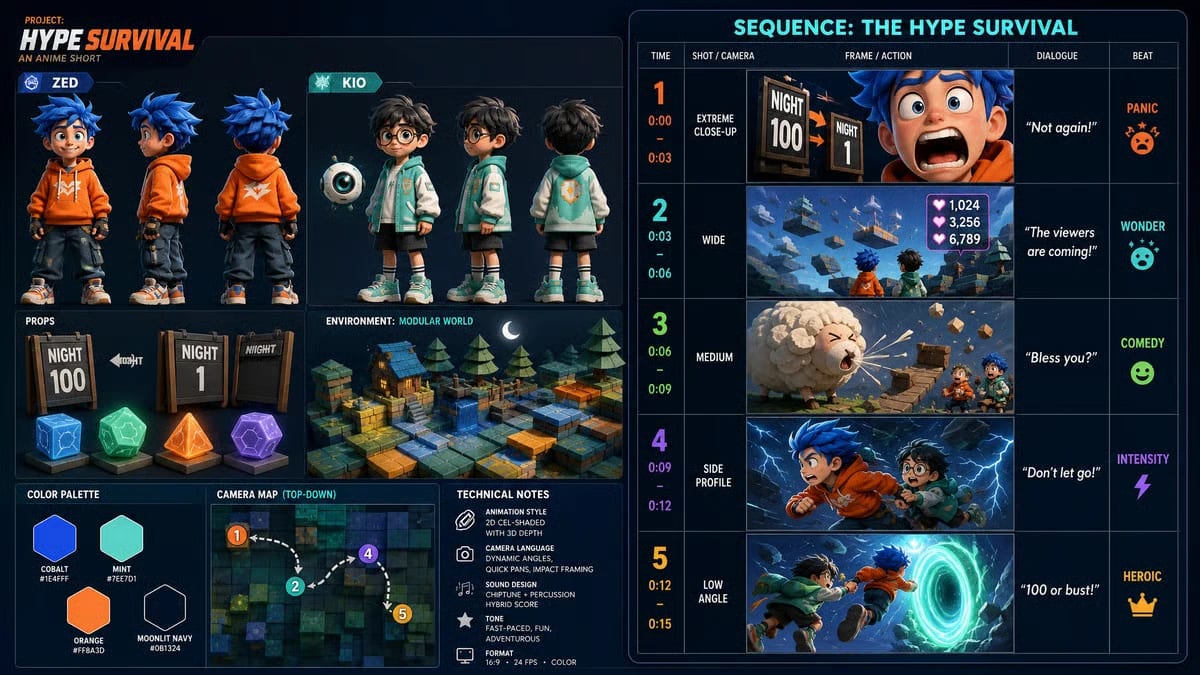
The generated storyboard made the characters, world, shot order, camera choices, and emotional beats visible before video generation.
The idea came from the online excitement around a creator gaming marathon. I did not want to reproduce real creators, official game assets, protected characters, logos, or interface elements. I wanted an original comedy-adventure with the same kind of chaotic co-op energy.
The story had five important beats:
My original production brief was written as a 30-second idea. The current GPT Image2 to Video tool creates a 15-second sequence, so I treated the longer brief as a source of beats rather than a literal timing contract. The storyboard compressed those decisions into five panels that I could judge before generating video.
A useful prompt does more than name a style. I want it to answer six questions:
| Prompt element | What it controls in this project |
|---|---|
| Delivery | 16:9 widescreen, anime cel animation, short sequence |
| Character anchors | blue hair and orange hoodie for Zed; glasses and mint jacket for Kio |
| World anchors | modular geometric fantasy world, paper-like trees, block-built bridge |
| Beat order | reset, arrival, comedy break, storm chase, teamwork payoff |
| Finish | cobalt, mint, orange, moonlit navy; readable action and clean silhouettes |
| Exclusions | no real-person likenesses, official game assets, copied UI, logos, or copyrighted audio |
Here is the compact version I would use for the 15-second workflow now:
Create an original 15-second 16:9 anime comedy-adventure in polished 2D cel animation.

Zed is an original adventurer with spiky cobalt hair, an orange hoodie, and black wristbands. Kio is an original adventurer with round glasses, a mint jacket, and a small floating camera orb. Keep their faces, hair, colors, outfits, and proportions recognizable across every beat. They must not resemble real creators.

Set the story in an original modular fantasy world built from hand-painted geometric stones and paper-like trees. Begin when a floating “Night 100” sign resets to “Night 1.” Reveal the world assembling around the pair. A sheep-shaped paper cloud sneezes and breaks their bridge. A lightning storm begins, forcing them to run together. End when their orange and mint wristbands ignite and they leap toward a glowing portal.

Use clear shot progression, expressive anime reactions, crisp silhouettes, cobalt, mint, orange, and moonlit navy. Original chiptune-percussion energy; no copyrighted melody.

Avoid real-person likenesses, official Minecraft textures, mobs, logos, tools, UI, branded usernames, copied game sounds, photorealism, face drift, costume changes, extra limbs, broken hands, unreadable text, and watermarks.
The prompt establishes the creative contract. It still leaves the image system room to compose the board.
Do I always need this much detail? No. A detailed prompt lets me author more of the boundaries myself. A short prompt delegates more decisions to the storyboard stage, which makes the review checkpoint even more important. I tested that difference with a one-sentence control later in this article.
If you want a more complete method for turning story beats into shots, use the script-to-anime storyboard workflow. For recurring characters, define a small set of stable character identity anchors before asking for several angles.
This is the step I care about most.
The tool converts the story into one wide storyboard. In this case, the board included:
That single image became my review checkpoint.
I could see that the orange and mint character roles remained distinct. I could see whether the world felt playful enough. I could see that the sequence moved from panic to wonder, comedy, intensity, and a heroic finish. I could also see the risky shots: a bridge collapse, two characters running together, and physical contact at the portal.
The board also made the system’s interpretation visible. The characters read younger and rounder than the word “adult” in my original brief. I accepted that direction for this playful experiment. If age presentation had been important to the story, this would have been the moment to revise or regenerate—before spending the video pass.
Use this quick storyboard check:
If the board fails one of these checks, I would correct the still plan first. A still image is faster to inspect than hundreds of moving frames.
After I accepted the board, I generated the video. The current tool uses the complete storyboard as visual guidance for the 15-second sequence instead of treating only one opening frame as the reference.
For a reusable shot-by-shot method beyond this single experiment, use the storyboard image-to-video workflow.
My exported file was 15.05 seconds, 1280×720, and 24fps. The finished sequence preserved the main arc:
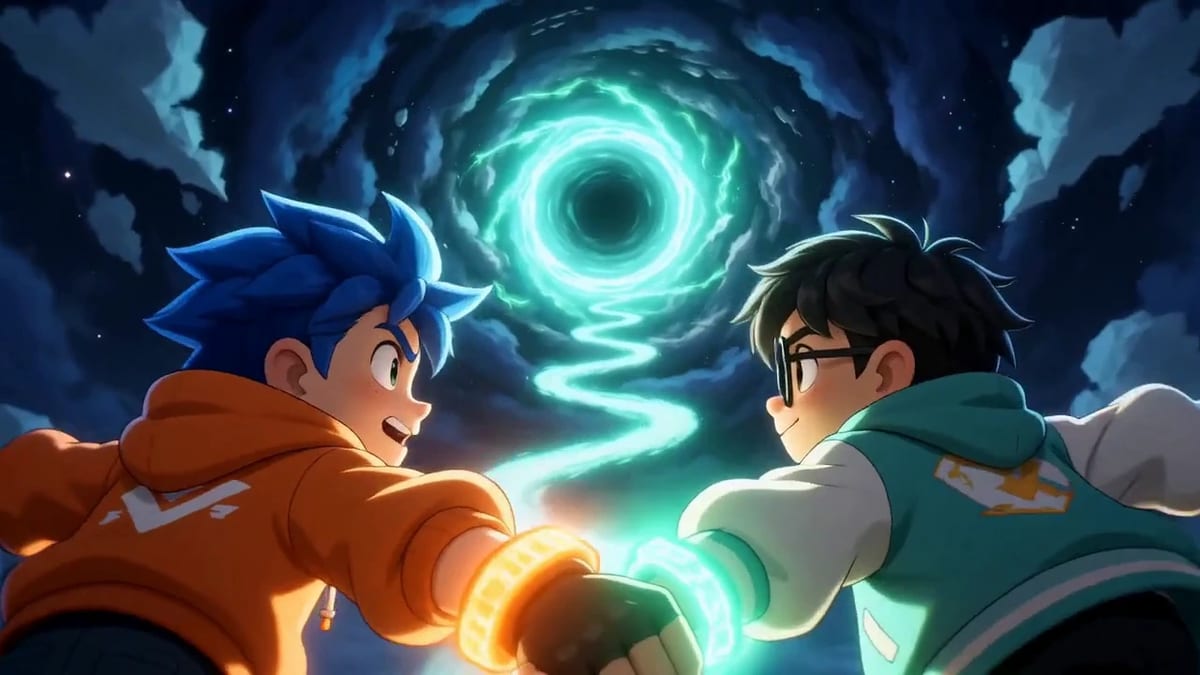
A frame from the finished 15-second sequence, generated after the storyboard was approved.
Watch the finished 15-second anime on YouTube.
I still review the result like any generated video. I check faces, hands, character scale, action order, camera clarity, text, and the ending. A storyboard narrows the surprise. It does not remove generative variation.
I wanted to know whether the first result depended on my long prompt doing all the production planning.
So I ran a deliberately under-specified control. The entire written prompt was:
Generate a promotional video for the Xiaomi SU7 car.
I selected the American 3D visual style in the interface. I did not write a shot list, color palette, camera plan, environment, soundtrack direction, slogan, or ending.
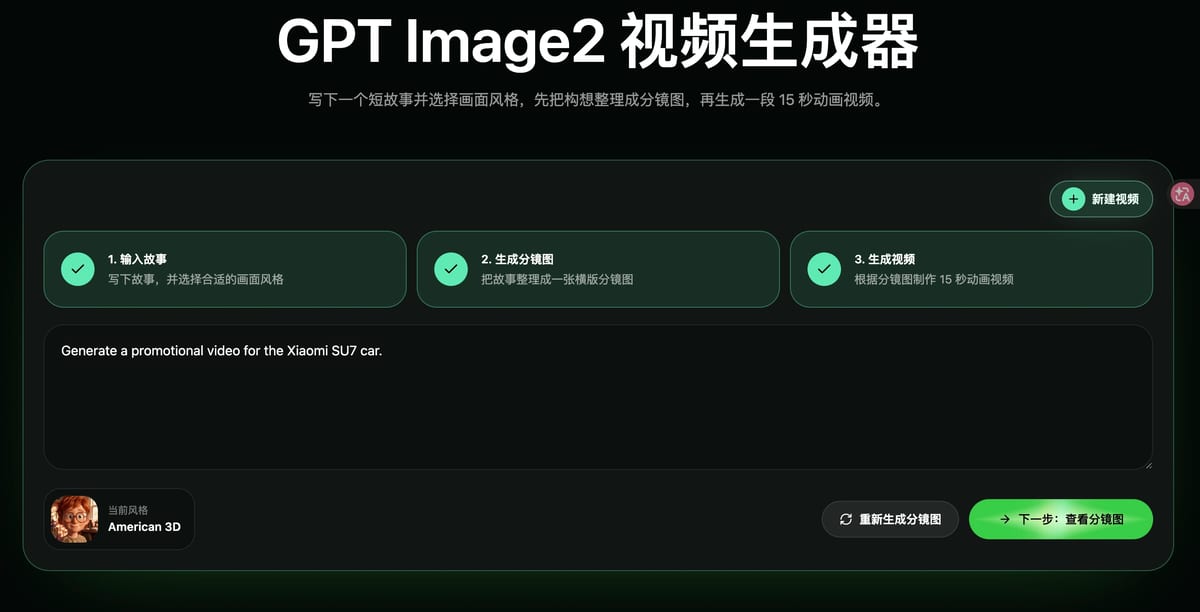
The entire written prompt for this control run was one sentence; the visual style was selected separately in the interface.
The generated storyboard supplied the missing production language. It chose a blue-car, night-city direction and organized the concept into five timed shots:
It also specified lenses, shot sizes, camera motion, short copy, audio cues, emotional intent, an interior mood, a camera path, and a color palette.
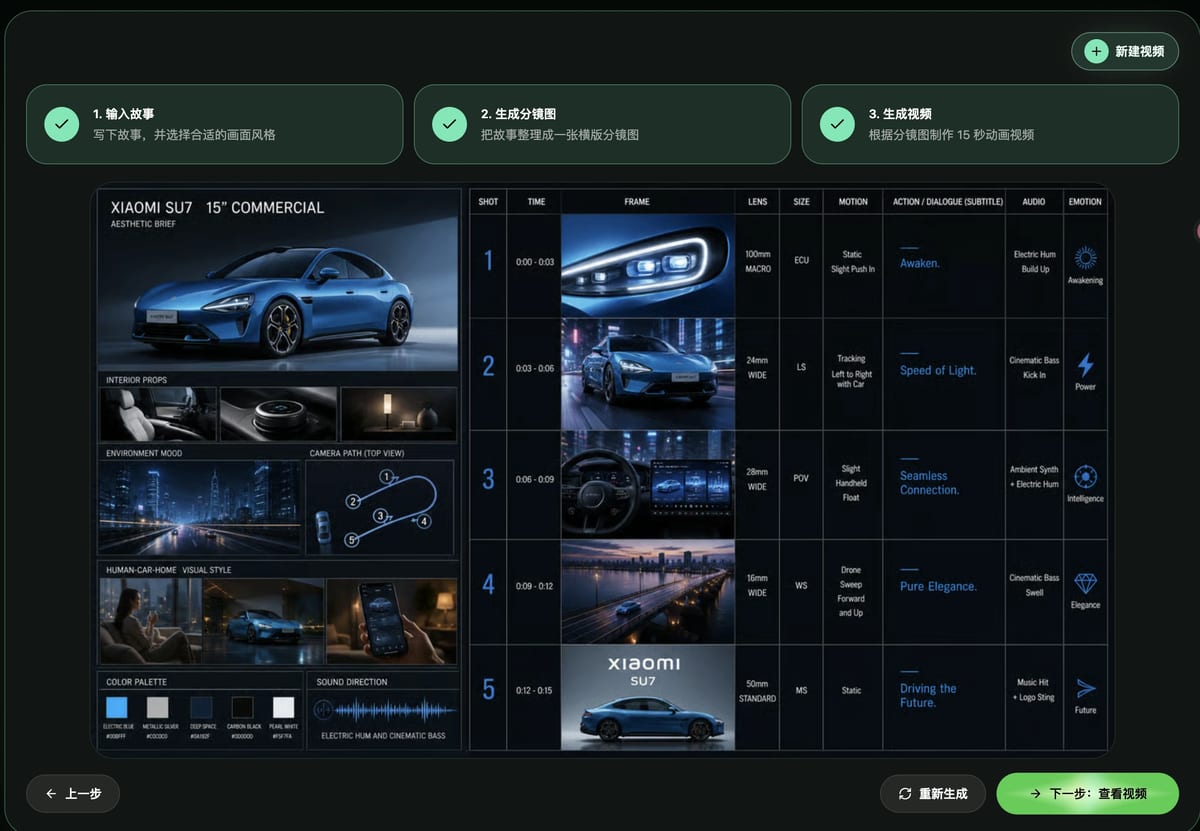
The storyboard expanded one sentence into a reviewable 15-second commercial plan.
| The written prompt supplied | The storyboard supplied |
|---|---|
| Product and task | Blue premium visual direction |
| “Promotional video” | Five three-second beats |
| No camera instructions | Macro, tracking, POV, drone, and static finish |
| No environment | Neon city, bridge, skyline, interior, and studio end card |
| No sound or emotion | Electric hum, cinematic bass, music hit, and an emotion for every beat |
This distinction matters. The one-sentence prompt did not secretly contain a commercial. The workflow proposed one in a format I could inspect before spending the video pass.
After I approved the board, the exported result was again 15.046 seconds, 1280×720, and 24fps. The finished video opened on a polished headlight macro, moved through night driving and an interior view, widened to a bridge and skyline, and ended on the blue car with a product title.
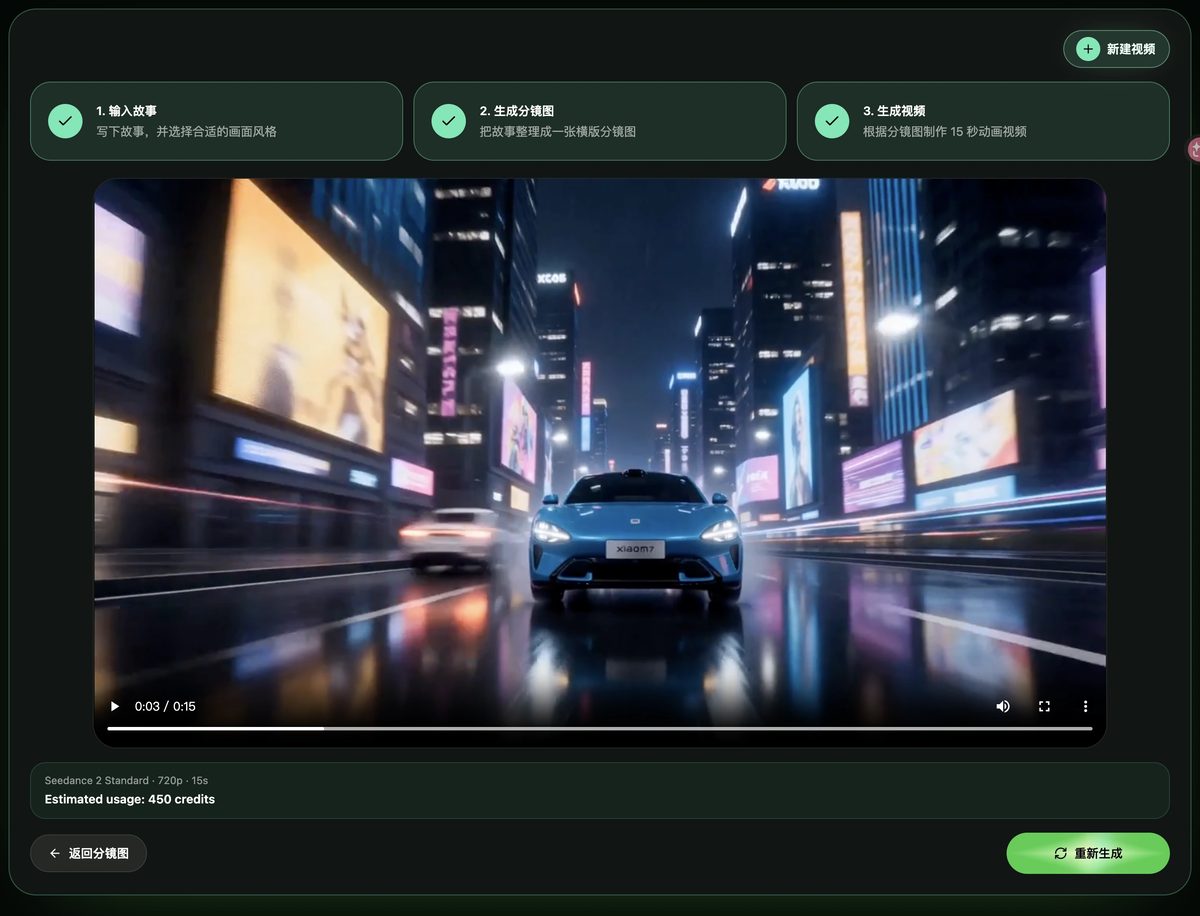
The 15-second result retained the board’s blue-car, night-city, premium-commercial arc.
The motion did not reproduce every storyboard panel as literal frame-for-frame timing. It did preserve a coherent subject, palette, environment, escalation, and ending across multiple shots. For a prompt with no written camera or sequence direction, that is a strong result from this specific run.
This was an independent AI workflow demonstration, not an official Xiaomi advertisement or a test of product-specification accuracy. Brand text, vehicle details, claims, and visual fidelity would still require human review before any commercial use.
The control does not prove that every one-line prompt will produce a strong video. It demonstrates something narrower and more useful: the storyboard layer can turn a sparse request into visible production decisions, and I can approve or reject those decisions before animation.
These two runs are hands-on examples, not a controlled model or cost comparison. I am not claiming that every storyboard-first run costs less than every direct text-to-video run. That would require the same models, settings, prompts, and number of attempts.
The practical benefit is simpler: I can reject a visual decision before it becomes a video decision.
If the character design is wrong, I see it on the board. If the environment misses the tone, I see it on the board. If the joke arrives after the action climax, I see it on the board. I can decide whether to continue while the project is still one inspectable image.
For one isolated performance, a single image-to-video shot may be enough. For a short with several scenes, a storyboard gives those scenes a shared source of truth. For a longer episode, move into the complete AI anime episode workflow, where characters, scenes, shots, dialogue, and revisions can remain organized beyond one 15-second clip.
Before the next video generation, I ask:
Three steps are enough. The important part is that Step 2 is a real approval gate.
The most expensive time to discover a bad shot is after it already moves.
Write the story with visible constraints when those constraints matter. If the prompt is brief, inspect the system’s proposed decisions even more carefully. Generate one board that exposes the characters or product, world, and sequence. Approve that board before animation. Then let the video model solve motion with more of the creative direction already decided.
That is how I turned a detailed anime prompt into Hype Survival and a one-sentence car prompt into a coherent commercial concept—without asking the video stage to invent an invisible production plan and reveal it only after the credits were spent.
From inspiration to complete plot, quickly output chapter structure