
Back to blog
Aug 8, 2026
How to Turn an Anime Image Into Video: A Shot-First Workflow
Learn how to prepare an anime image for video, define readable motion, control the camera, protect character identity, and review the finished shot.
Aug 8, 2026
Learn how to prepare an anime image for video, define readable motion, control the camera, protect character identity, and review the finished shot.
Plan the motion, camera, environment, and ending before asking a still image to become a scene.
By Sonya, Contributor of MkAnime · Published August 8, 2026
Disclosure: I contribute to MkAnime, whose GPT Image2 to Video tool appears in this guide. AI assistance was used to organize and edit the article. I reviewed the workflow and product details against the current MkAnime implementation on August 8, 2026.
Turning an anime image into video starts with one decision: what should change during the shot? A still image defines appearance and composition. A video also needs time, action, camera behavior, environmental response, and a clear ending.
Use this five-part plan:
Identity anchors + ordered action + camera role + environmental response + end frame
If any part is missing, the generator must invent it. That invention may be attractive, but it can also create face drift, random camera movement, loose clothing motion, or an ending that does not support the next shot.
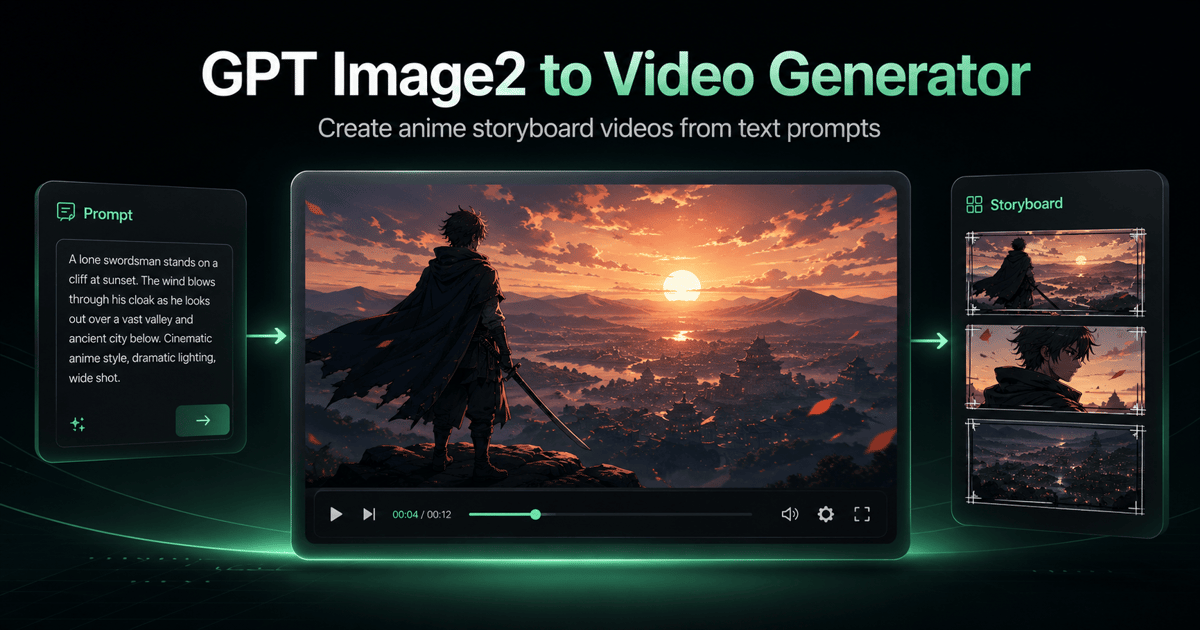
Before adding more motion, compare the source plan with the finished clip. This original ice-cream storyboard keeps the character, product, setting, five-shot order, camera choices, sound cues, and ending visible in one frame.
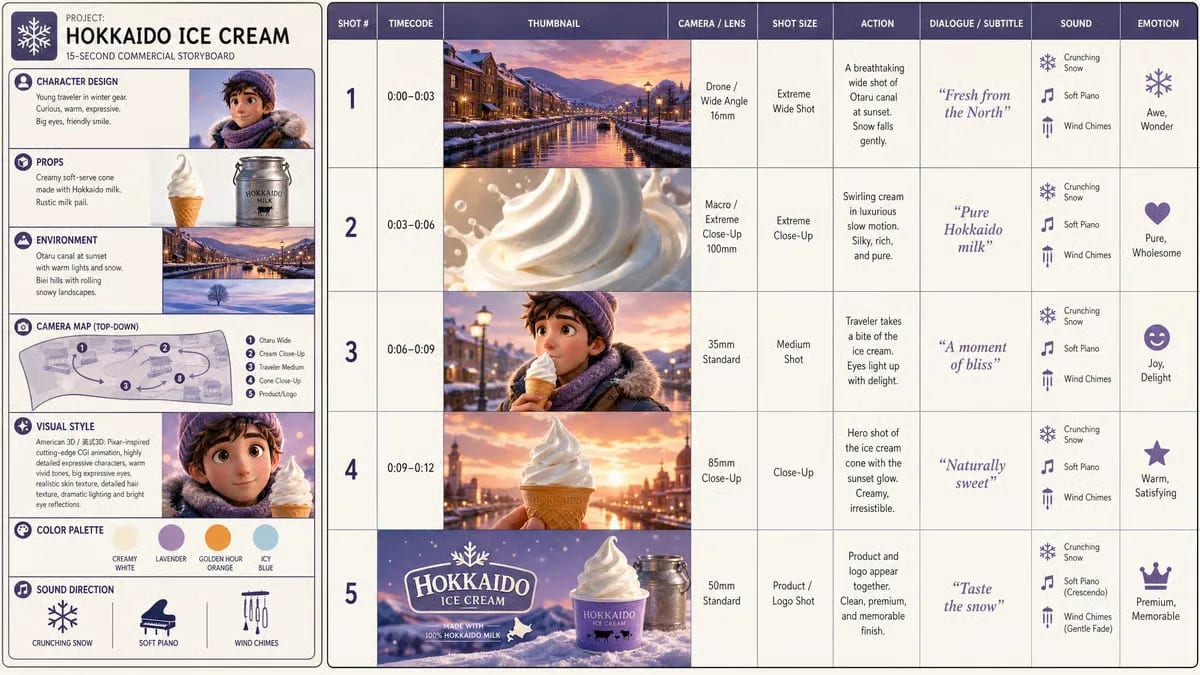
The source image exposes the visual and timing decisions before video generation.
The final clip follows the approved sequence from location reveal to character beat and product ending.
A polished illustration is not automatically a useful video source. Inspect the image as production material.
The main character, prop, or product should have a clear silhouette. Hands that merge into clothing, hair that disappears into the background, or a face that is already heavily blurred leave less information to preserve.
Record three identity anchors before writing motion. For an original anime courier, they might be:
These anchors provide a review standard. “Keep the character consistent” is difficult to judge. “Keep the red clip on the left and the shoulder strap crossing in the same direction” is visible.
Motion needs room. A hand cannot reach for a prop that sits outside the frame. A full-body jump is difficult when the feet are already cropped. A camera push has little effect when the face fills the entire image.
Choose a source composition that supports the intended action:
| Intended motion | Helpful source composition |
|---|---|
| restrained expression or dialogue | medium close-up with clean face and shoulders |
| hand interaction with a prop | medium shot with both hands visible |
| walk, turn, or body action | full or three-quarter body with floor contact |
| camera push through an environment | foreground, subject, and background depth |
| animated poster or loop | centered hierarchy with controlled negative space |
A still image may imply depth through scale, overlap, focus, and perspective. Video motion makes those relationships more visible. Check which objects belong to the foreground, middle ground, and background. If the boundaries are unclear, keep the camera stable and animate one subject-level action first.
Logos, captions, signs, and speech balloons may deform when the image moves. Keep important copy outside the generated motion when possible, then add it during editing. If text must remain inside the shot, request a stable camera and minimal deformation around the text area, then inspect every frame.
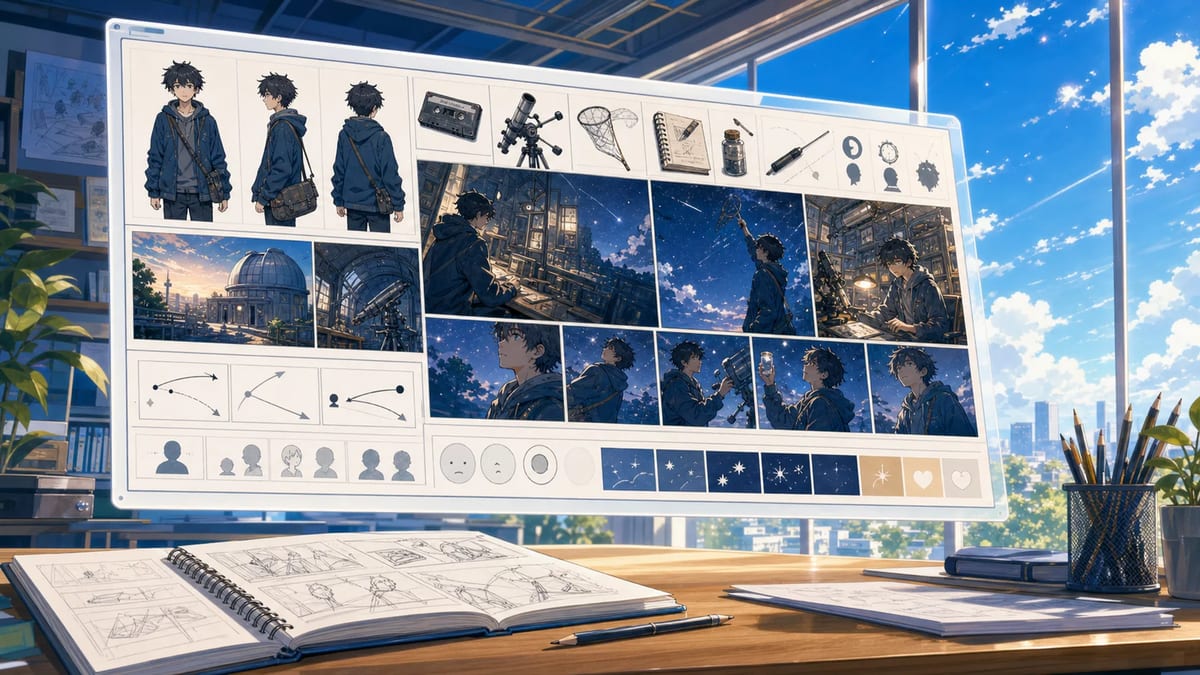
A storyboard image can carry character, environment, and shot order, but the motion plan still has to explain how the sequence unfolds.
Motion prompts often fail because they list moods instead of events.
Weak:
Cinematic, emotional, dynamic anime scene with beautiful movement.
The words describe a desired impression. They do not define what happens.
More useful:
The courier notices the station light flicker, looks over the left shoulder, tightens the bag strap with the left hand, takes one step toward the platform edge, then stops as the train enters the background.
The second version creates an ordered chain. Each action has a visible subject, direction, and endpoint.
For a short clip, use one primary action and no more than two supporting actions. Complexity increases quickly when the character, camera, clothing, particles, background, and lighting all change at once.
Camera motion should clarify the action. It should not compete with it.
Choose one role:
Avoid stacking several moves in a short prompt. “Push in, orbit, crane up, whip pan, and zoom out” creates conflicting camera logic.
If you want no camera movement, say so positively and specifically:
Locked tripod camera, fixed framing, fixed horizon, no zoom, no pan, no orbit. Only the character’s eyes, breathing, and jacket hem move.
This still requires inspection. A prompt is a direction, not a mechanical guarantee.
Anime motion often feels more convincing when the environment supports the action at a smaller scale.
Useful secondary motion includes:
Write cause before effect. “The train enters, then the coat hem and platform papers respond to the displaced air” is more coherent than “windy dramatic motion everywhere.”
Keep environmental motion subordinate. If the story beat is a character noticing a signal, a storm of particles can hide the performance.
An image-to-video prompt needs an endpoint. Otherwise, motion may continue until the last frame and leave the shot visually unresolved.
Describe the finish as a composition:
End in a steady medium close-up. The courier faces the tunnel, the red hair clip remains visible on the left, the hand rests on the bag strap, and the approaching train light forms a warm rim behind the right shoulder.
The endpoint should support the edit. It may create a clean hold for a title, a pose that matches the next shot, or a visual answer to the opening question.
Use this template after reviewing the source image:
Create a [DURATION]-second original anime shot using the approved visual design.

IDENTITY: Preserve [THREE VISIBLE IDENTITY ANCHORS]. Keep the same face, body proportions, outfit construction, palette, and side-specific details.

START: Begin from [OPENING COMPOSITION AND CHARACTER STATE].

ACTION: [PRIMARY ACTION], then [SUPPORTING ACTION], caused by [VISIBLE TRIGGER]. Keep the action readable and physically connected.

CAMERA: [ONE CAMERA ROLE]. Keep [HORIZON / FRAMING / SUBJECT POSITION] stable.

ENVIRONMENT: [ONE OR TWO SECONDARY RESPONSES] after the primary action.

END: Finish on [SHOT SIZE, POSE, PROP POSITION, BACKGROUND RELATIONSHIP, AND HOLD].

VISUAL FINISH: [LINEWORK, SHADING, COLOR, LIGHT, AND MOTION TREATMENT].

AVOID: [UNWANTED CAMERA MOVES, EXTRA SUBJECTS, TEXT DEFORMATION, IDENTITY CHANGES, OR SPECIFIC ARTIFACTS].
For more scenario-specific wording, continue with the anime image-to-video prompt templates, which cover character performance, action, camera stability, loops, manga motion, and storyboard-guided sequences.
Create a 10-second original 2D cel-shaded anime shot. Preserve the adult courier’s angular face, short silver hair with a small red clip on the left, cropped rust jacket, dark collar, and black shoulder strap crossing from right shoulder to left hip.

Begin in a steady medium shot on an elevated station before sunrise. A distant platform light flickers twice. The courier looks toward it, takes one quiet breath, tightens the bag strap with the left hand, and shifts one step toward the warning line. A train light appears in the tunnel and the courier stops.

Camera: one slow stable push from medium shot to medium close-up. No orbit, no pan, no sudden zoom, no cut. Environment: the jacket hem moves slightly after the train enters; one paper ticket slides along the floor; the warm tunnel light grows across the right side of the face.

End in a steady medium close-up with the courier facing the tunnel, red clip still visible on the left, left hand resting on the strap, and warm light behind the right shoulder. Clean linework, simple cel shadows, restrained motion, cool blue dawn palette with warm amber contrast. No subtitles, logos, extra people, duplicated accessories, face drift, or unreadable signs.
The prompt establishes a visible trigger, a short action chain, one camera move, two environmental responses, and a precise finish. If the first result loses the face or strap, simplify the action before adding more atmosphere.
Do not judge everything at once.
| Pass | Review questions |
|---|---|
| Identity | Are the face, hair, outfit, palette, accessories, and left/right details preserved? |
| Action | Is the cause-and-effect chain readable? Are hand and prop contacts believable? |
| Camera | Does the move clarify the subject? Does the horizon and framing stay controlled? |
| Environment | Do secondary motions respond to a cause without hiding the subject? |
| Endpoint | Does the final composition arrive, settle, and support the next edit? |
Keep the useful take and change one variable. If identity drifts, reduce body and camera motion. If the shot feels static, strengthen one action rather than adding five effects. If the ending is weak, rewrite only the endpoint.
For recurring characters across several shots, use the AI anime character consistency workflow to separate permanent identity from shot-specific action, lighting, and expression.
A single portrait can guide one performance. A sequence with several beats benefits from a storyboard that already shows the character, environment, shot order, and visual rhythm.
The script-to-anime storyboard guide explains how to turn story beats into inspectable shots. Once the storyboard is approved, use the storyboard image-to-video workflow to assign each beat a job, time the transitions, and preserve continuity between those decisions.
MkAnime’s GPT Image2 to Video tool follows that order: write a short story, choose a style, generate a wide storyboard image, review it, then create a 15-second video guided by the complete board. The tool creates the storyboard inside the workflow; it does not require you to begin with a finished external image.
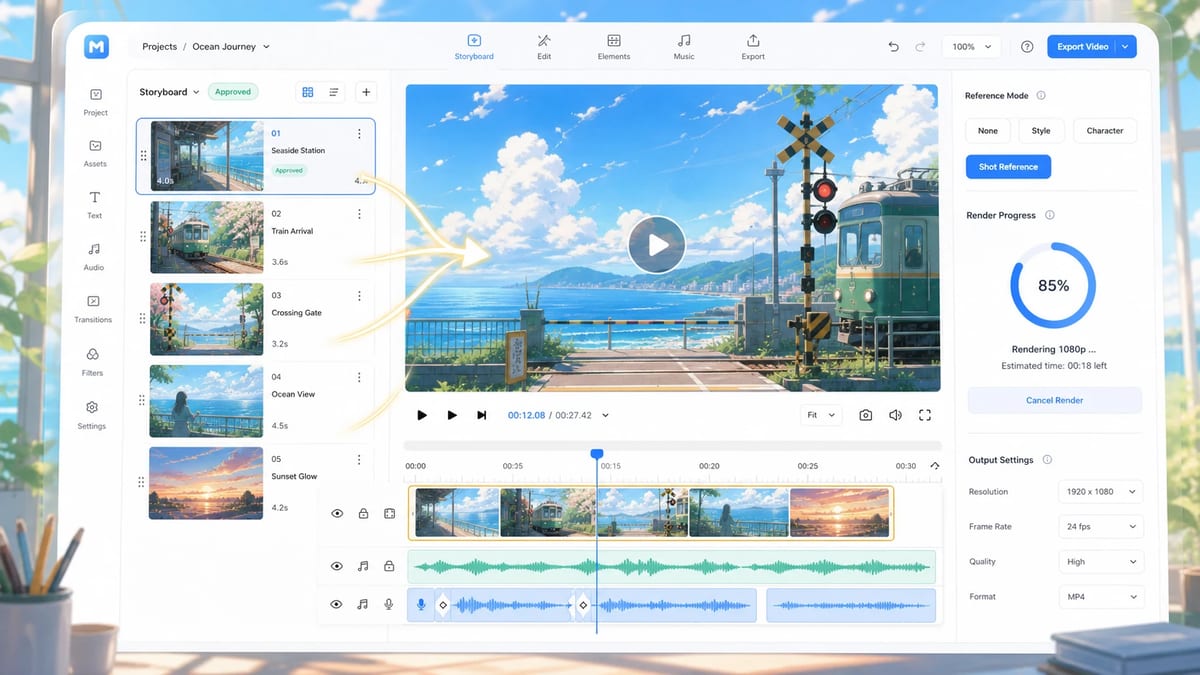
The video step follows an approved storyboard instead of asking the system to invent the visual plan and motion at the same time.
For longer work, treat each approved clip as one part of the broader AI anime video workflow. The project should retain the character, story, shot purpose, and continuity decisions that one generated clip cannot remember on its own.
An image can be used as visual direction, but some compositions carry motion more clearly than others. Clean silhouettes, visible hands, readable depth, and enough space for the intended action give the motion plan more information. Rights and permissions also matter: use images you created or are authorized to animate.
Start with one primary action, one camera role, and one or two environmental responses. Add complexity only after the character and composition survive the first test.
Describe the desired stable setup: locked tripod, fixed horizon, fixed framing, no zoom, no pan, and no orbit. Then specify the subject-level motion that should remain. Review the result because prompt language cannot guarantee a perfectly static camera.
Use a short list of visible conflicts: extra people, duplicated accessories, face drift, camera orbit, warped text, or cropped hands. Positive direction should still define the intended action and composition.
Use a single image for one performance or composition. Use a storyboard when the clip contains several connected beats, camera changes, or continuity requirements. The storyboard makes more of the sequence inspectable before video generation.
An anime image becomes a useful video source when it contains readable identity, space, and depth—and when the prompt supplies the missing time design. Define one action chain, give the camera one job, connect environmental motion to a cause, and end on a deliberate composition.
The goal is not motion everywhere. The goal is a shot whose changes are clear enough to direct, review, and use.
From inspiration to complete plot, quickly output chapter structure